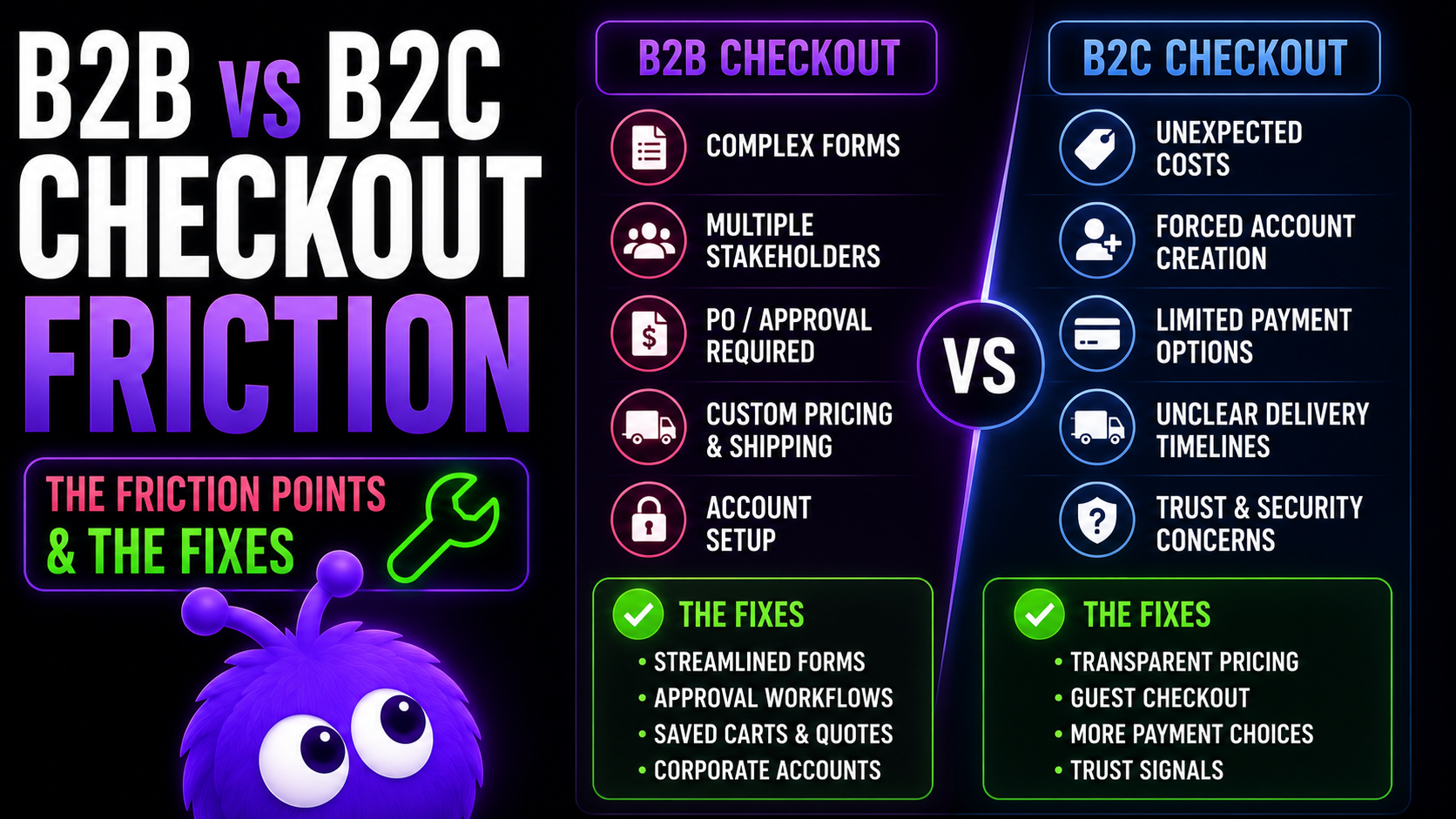
A decade of checkout advice was written for B2C: cut the steps, accept every wallet, get the visitor to "buy" in three clicks. That advice is right, for B2C. Apply it to a B2B store without thinking, and you break things buyers actually need. They cannot enter a PO number, cannot route an order for approval, cannot ask for Net-30, cannot bill to their freight account. The friction you stripped out was the part that let them buy.
This article covers the seven B2B friction points that should stay, the four that should go, and the three ways to serve both audiences from one store.
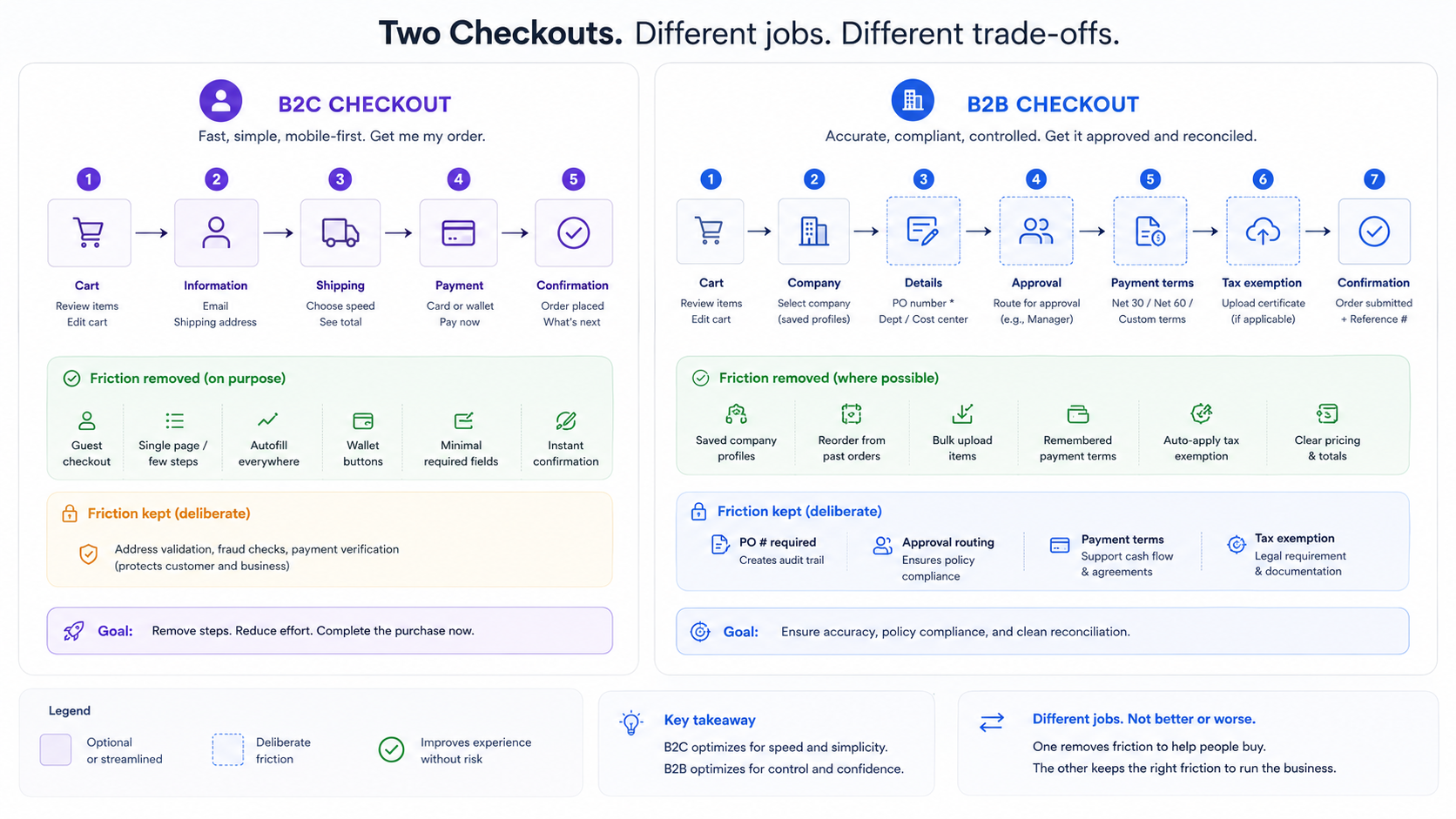
Which B2B friction points should stay?
| Friction point | Why it exists | B2C equivalent (if any) |
|---|---|---|
| PO number capture | Procurement system requirement; AP cannot pay without | None |
| Approval workflow routing | Multi-stakeholder governance | None |
| Payment-terms selection (not credit card only) | Net-30/Net-60/wire/ACH/PO/BNPL options | Single credit card / wallet |
| Tax-exemption certificate validation | Legal requirement (resale, manufacturing, gov) | None typically |
| MOQ enforcement | Operational constraint protecting margins | None |
| Account-specific pricing visibility | Negotiated tiers must display correctly | None typically |
| Shipping-account capture (FedEx/UPS bill-to) | Standard B2B freight billing | None |
Every one of these is a governance or operational feature specific to how businesses buy. Strip them out to "simplify checkout" and you take away the buyer's ability to actually complete the order.
Which B2B friction points should go?
These four hurt completion without serving any B2B purpose.
Forced account creation before pricing is visible. B2C settled this back in 2018: guest checkout lifts conversion, full stop. B2B drifted back to forced accounts on the logic that "wholesale pricing requires login." Those are two different things. Gating checkout on an account is fine. Gating pricing visibility on an account is not.
Surprise fees mid-checkout. Handling fees, fuel surcharges, freight estimates that only appear at the final step. B2B buyers read that as dishonesty, and the trust hit is hard to recover. Move every fee to the cart or product page, and surface a freight estimate from a ZIP lookup before checkout starts.
Multi-page navigation that resets the cart on the back button. B2B buyers research across multiple sessions and lean on the back button like it owes them money. Resetting the cart on back-navigation is a B2C anti-pattern; the cart should survive both the back button and the gap between sessions.
Address validation that only understands B2C addresses. "Street, City, State, ZIP" is not enough. B2B addresses carry suite numbers, dock numbers, attention lines, and freight-receiving hours, and a validator that rejects them blocks legitimate orders.
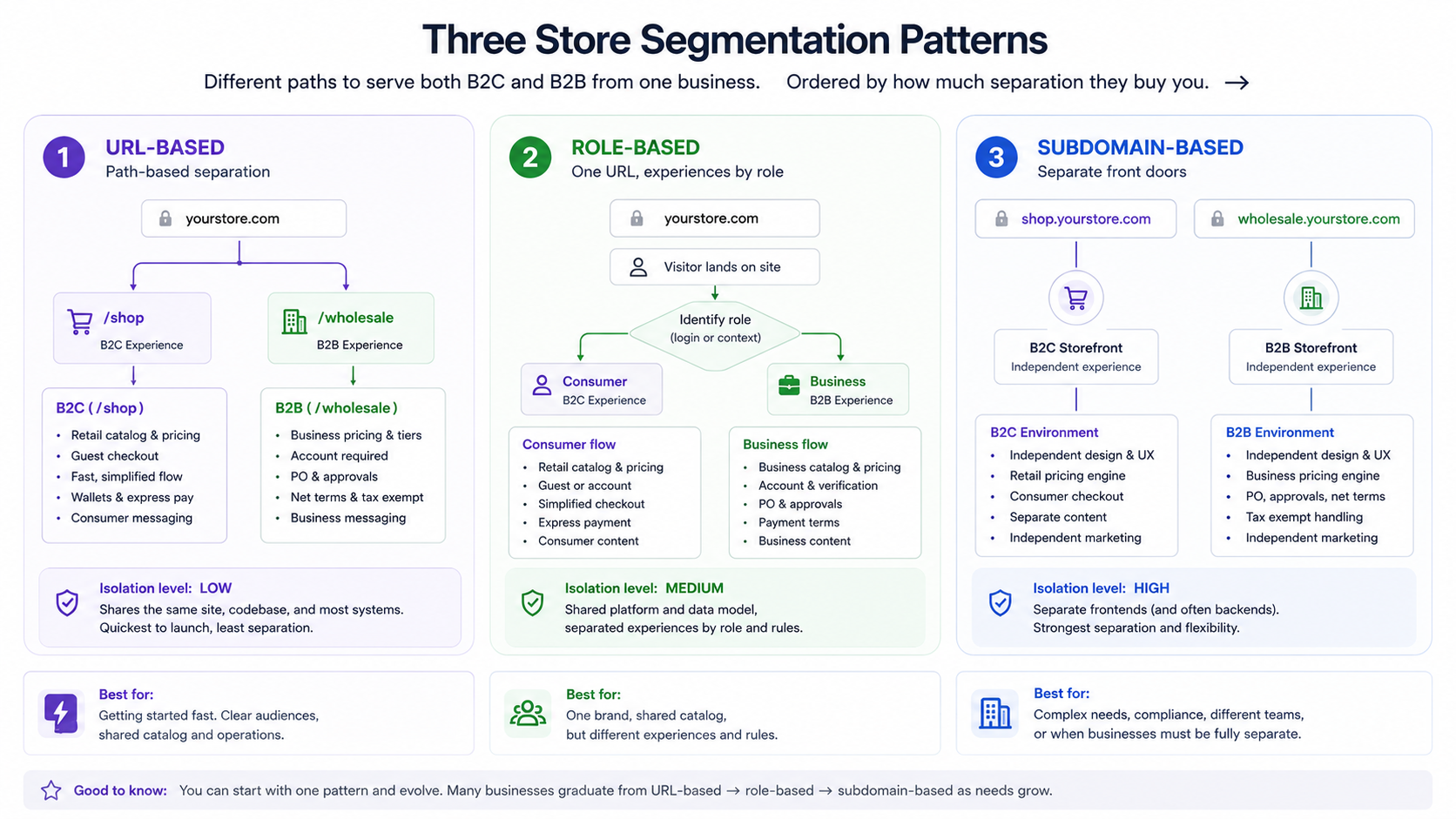
How do I segment a single store for both B2B and B2C?
Three patterns, in rough order of how much separation they buy you.
URL-based segmentation.
example.com/shop      → B2C theme + checkout
example.com/wholesale → B2B theme + checkout
The cleanest split: different theme files, different checkout flows, different intervention libraries. Worth the dual-theme overhead when B2B volume is substantial.
Role-based segmentation.
Same URL, with the checkout adapting to the logged-in customer's role:
if (customer.role === 'wholesale') {
  showB2BCheckout;
} else {
  showB2CCheckout;
}
The most flexible option and the lowest setup overhead, which is why it is the most common. It fits the "we are one company with two audiences" mental model.
Subdomain segmentation.
shop.example.com      → separate B2C store
wholesale.example.com → separate B2B store
The highest isolation, and you can even run different platforms per channel (Shopify for B2C, WooCommerce for wholesale). Right when the two channels have genuinely different operational requirements.
How do approval workflows work?
Two patterns cover almost everyone.
Native approval workflow (Shopify B2B, B2BWoo, WooCommerce B2B). The order is held in a pending-approval state, notifications go to the approval chain, approvers click to approve, and the order proceeds once everyone signs off. Right for multi-stakeholder approval cultures: medical-device, government, complex enterprise.
External-routing approval. The order completes at checkout but is flagged for AP review out of band, with Net-30 providing the buffer while that happens. Right for the more common single-buyer-with-AP-oversight setup in mid-market B2B.
The B2B ecommerce playbook covers implementing both. Most stores ship the external-routing pattern because it is simpler operationally; the native workflow is the right call when approval governance is a real customer requirement.
What's the typical B2B checkout completion rate?
Lower than B2C in a single session, and that is expected rather than broken. B2B buyers research, get approval, and come back, often days later. Single-session completion badly under-counts what actually converts; the multi-session rate is the figure that reflects the real path. Judge a B2B checkout on the multi-session number, or you will "fix" a funnel that is working exactly as designed.
Where does Yokaify segment between B2B and B2C?
Yokaify reads the customer's role or segment flag and serves a different intervention library to each.
The B2C library (the default):
- First-time discount offers (10% off your first order).
- Urgency timers on limited-stock items.
- Celebratory mascot animations on cart-add.
- A short dwell-tolerance before triggering, since B2C research is fast.
- "Free shipping over $X" reminders.
The B2B library:
- No first-time discounts (wholesale customers already have negotiated pricing).
- No urgency timers (scarcity does not move B2B buyers — a countdown clock on a Net-30 purchase order lands about as well as a fire alarm in a library).
- Subdued mascot animations, since over-energetic reads as B2C-coded.
- A longer dwell-tolerance, because B2B research runs long.
- More "show me tier 3 pricing" help.
- More MOQ-explanation overlays.
- Approval-workflow status surfacing when the order is sitting in pending-approval.
You configure the segmentation once during setup; from there the agent checks the customer's role (or the equivalent segment field) and serves the matching library.
What this means for buyers
A few takeaways:
- Do not optimise B2B checkout like B2C checkout. The seven friction points are features, not bugs.
- Segment with the role-based pattern unless your volume justifies the URL or subdomain approach.
- Serve a different intervention library per segment. B2B and B2C audiences react differently to urgency, discounts, and tone.
The short version: B2C minimises friction, B2B preserves the right friction. Segment, configure, ship.
Further reading
- GuideB2B ecommerce playbookThe platform-level B2B context.
- GuideCRO playbookB2C checkout optimisation context.
- BlogCheckout page optimisationB2C checkout-friction reduction.
- BlogMulti-step vs one-page checkoutThe form-structure decision underneath both flows.
- BlogProactive chat for B2B service businessesThe B2B-tuned engagement posture.
- ToolCart abandonment calculatorModel the recovery upside on either segment.
Frequently asked questions
B2C minimises friction; B2B preserves operational and governance friction. Different audiences, different patterns.
Last updated June 10, 2026.