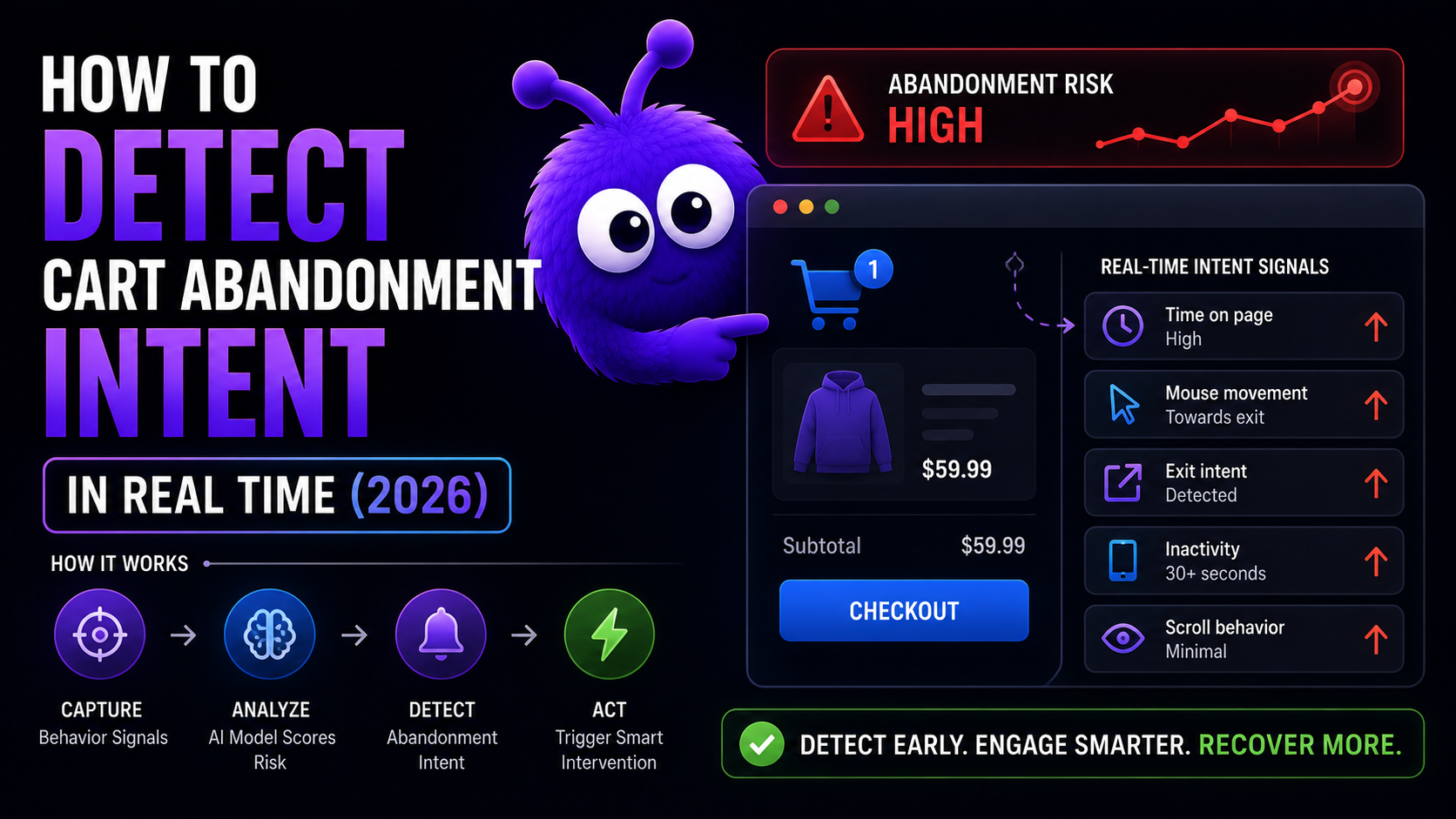
The old cart-recovery toolkit was entirely after the fact: the visitor leaves, an email goes out half an hour later, and you win back a slice of those carts. That still has its place, but it gives up the most valuable window - the one where the visitor is still on the page. To use that window you need to read intent while it is forming, which comes down to knowing which signals predict a departure, how early, and with how much noise.
This post covers the signals worth reading - exit-vector, dwell, scroll-back, scroll depth, and hover - how each is detected, and the combinator pattern that turns noisy individual readings into something worth acting on.
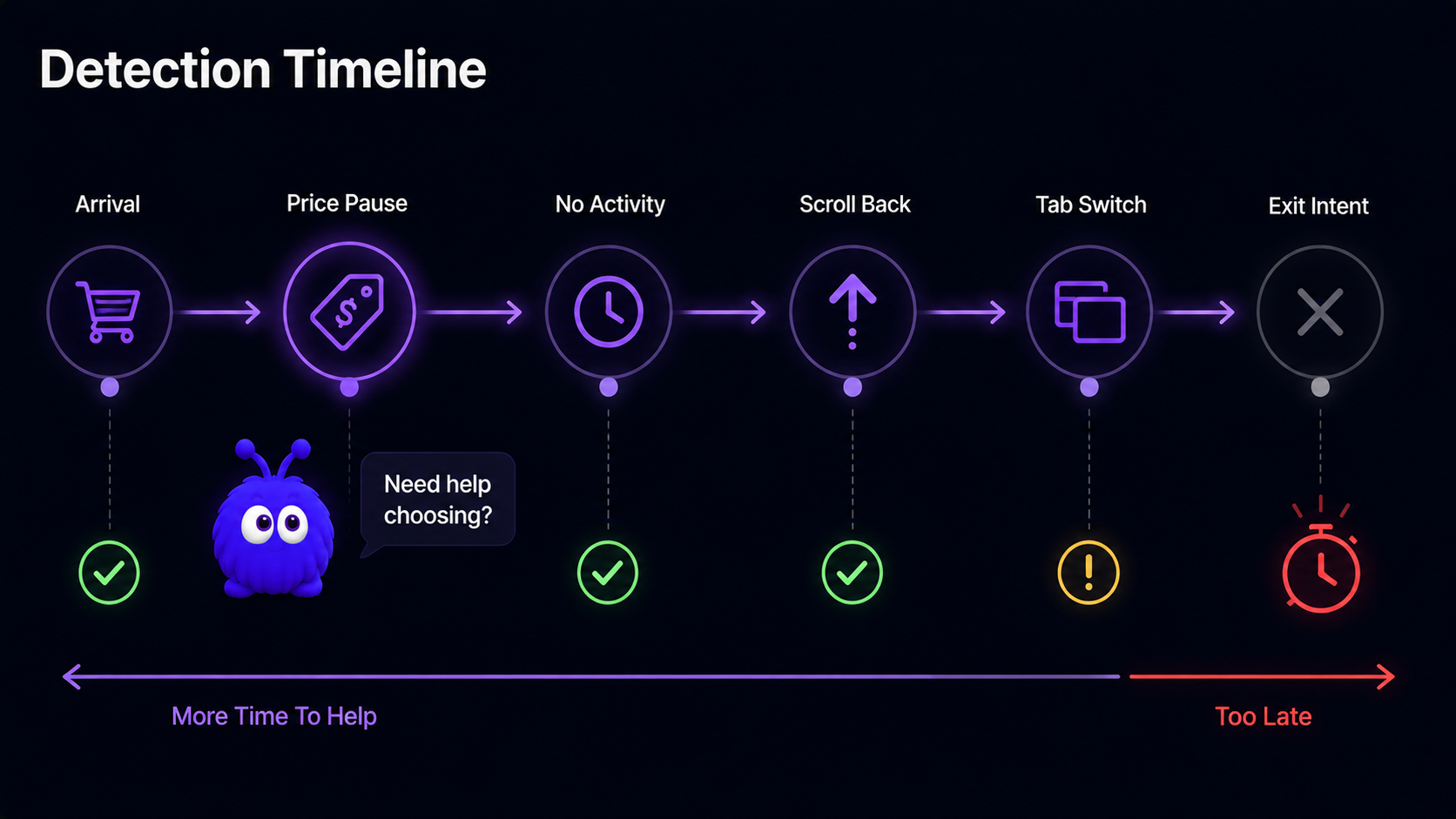
What signals predict cart abandonment in real time?
| Signal | Detection mechanism | Window before exit | Noise on its own |
|---|---|---|---|
| Cursor-pause on price | mouseenter on price element + a few seconds of hover without further movement | Earliest | High |
| Cart-page dwell with no form activity | long time-on-cart + zero input events | Early | High |
| Scroll-back from checkout to cart | history navigation + scroll-position regression | Mid | Moderate |
| Repeated tab-switching | several document.visibilitychange events in a short window | Mid | High |
| Exit-intent vector | mouseleave to top of viewport, or rapid scroll-to-top on mobile | Latest | High |
Any one signal on its own is noisy. A cursor that pauses on the price might belong to someone about to buy, or to someone who just alt-tabbed away to read a review. Act on every pause and you over-intervene, surfacing a chat panel every time someone glances at a price - which trains them to ignore it.
Combining signals fixes most of the noise. Two signals inside a short window catch a meaningfully cleaner cohort than either alone; three signals tighten it further at the cost of a smaller audience. Two signals is the right setting when intervention is cheap; three is right when it is expensive, like a human handover or a margin-costing offer.
How early can abandonment be predicted?
The visitor lands on the cart, the cursor stops on the price, and a chain of small decisions follows: compare, calculate, hesitate, eventually leave.
Exit-intent fires last by definition - the cursor is already heading for the close button. By then the visitor has only seconds of attention, enough for a coupon or a one-line objection-handler, but not enough for a comparison or a real explanation.
So design interventions to trigger on the early signals (cursor-pause, dwell-with-no-activity), not on exit-intent. An early trigger has time to actually help; a late one is a last-ditch save. The proactive-chat psychology backbone post covers the framing that pairs with early triggers.
Why not just use exit-intent on its own?
Three reasons it falls short as your only trigger.
The window is too narrow. A few seconds is not enough time for the visitor to take in anything meaningful. They see a popup, dismiss it on reflex, and keep leaving.
Mobile detection is unreliable. On mobile there is no cursor, so exit-intent is approximated by a rapid scroll-to-top or an app-switcher gesture, both noisy. With most 2026 ecommerce traffic now on mobile, an exit-intent-only trigger serves the majority of your visitors poorly.
Banner blindness. Exit-intent popups have been everywhere since roughly the dawn of the coupon code, and visitors are trained to dismiss them before they have finished rendering.
The better architecture is layered: early signals catch the deliberation phase, and exit-intent is the fallback for anyone who did not trip an earlier signal.
How does scroll depth fit in?
Most analytics tools surface scroll depth as a single percentage - "your visitors reach 64% scroll depth on average" - which is computed correctly and means almost nothing. A category-grid 64% suggests paralysis; a product-page 64% suggests consideration; a checkout-page 64% suggests form friction. Average them together and you get a number that blends several different intent states into one tidy, useless figure.
| Page type | Below 25% | 25-50% | 50-75% | 75-90% | 90%+ |
|---|---|---|---|---|---|
| Product detail page | No-intent | Browsing | Considering | High-intent | Spec-checking or returning |
| Category grid | Bounce risk | Browsing | Filtering | Paralysis risk | Filter-rebound |
| Cart page | Mid-decision | Reviewing | Form-engaged | Form-near-complete | Coupon-search |
| Checkout step | Form-just-loaded | Filling | Mid-form | Reviewing | Submitting |
The lesson: the same depth means different things across page types, and even across stages within one session - a first-visit 75% on a product page is consideration, a second-visit 75% is verification before buying. Track the 25/50/75/90 marks plus exit position, and skip 100% as a threshold; the bottom of most pages is footer links nobody reads on purpose.
const marks = [0.25, 0.5, 0.75, 0.9]
const fired = new Set()
function checkScroll() {
  const docH = document.documentElement.scrollHeight - window.innerHeight
  if (docH <= 0) return
  const ratio = window.scrollY / docH
  for (const m of marks) {
    if (ratio >= m && !fired.has(m)) {
      fired.add(m)
      window.dispatchEvent(new CustomEvent('scrollDepth', { detail: { mark: m } }))
    }
  }
}
window.addEventListener('scroll', checkScroll, { passive: true })
Scroll depth is weak as a sole trigger - a bare "fire at 75%" catches scanners, returners, and fast mobile-scrollers along with the considered shoppers you wanted. Pairing it with one more signal sharpens it: 75% plus dwell-at-depth, or 75% plus a cursor-pause on the price. Mobile visitors also scroll noticeably faster than desktop visitors, so a mobile 60% is closer in intent to a desktop 75%; gating on dwell-at-depth rather than raw depth is the more honest cross-device approach.
Does hover predict purchase intent?
Cursor behavior splits into three states: motion, dwell, and hover. Hover - the cursor parked on one specific element - is the most precise of the three, because it tells you exactly which thing has someone's attention. A sustained hover on Add-to-Cart or the price, a few seconds without a click, is one of the tighter consideration signals you can read.
The mechanic is intuitive. The cursor stops on the element. The visitor reads, considers, hovers. Then one of three things happens: they click (consideration resolved, in your favor), the cursor leaves (resolved, not in your favor), or the cursor stays past a few seconds - which is the moment they are stuck, and the moment a nudge can help.
| Pattern | Element | Predicts | Intervention shape |
|---|---|---|---|
| CTA hover | Add to Cart, Buy Now | Cart-add hesitation | Question-answering, objection-resolving |
| Price hover | Price, currency, sale tag | Price hesitation | Bundle, free-shipping, payment-plan |
| Variant hover | Size/color picker, no selection | Choice paralysis | Narrowing question, recommendation |
| Reviews-tab hover | Reviews link or accordion | Trust-checking | Surface a relevant review or warranty info |
| Image-zoom hover | Image zoom area | Detail-checking | Surface spec table or comparison link |
Why hover beats click as a trigger: click is the conversion event, hover is the consideration step before it. A click-driven intervention catches the visitor after they have decided - good for an upsell, useless for resolving the hesitation. A hover-driven one catches them mid-decision, while the decision is still open. Both work, in different windows.
Hover does not survive a touchscreen, though - there are no mouseover events on mobile, so the equivalents are touch-pause and long-press, which are rarer but stronger evidence when they occur. And keyboard-only visitors produce focus events rather than hover events, so a hover-driven trigger should fall back to a focus-driven one:
button.addEventListener('focus', () => {
  focusTimer = setTimeout(() => {
    window.dispatchEvent(new CustomEvent('focus-to-purchase', {
      detail: { element: 'add-to-cart' }
    }))
  }, FOCUS_THRESHOLD_MS)
})
button.addEventListener('blur', () => clearTimeout(focusTimer))
The accessibility angle here is not optional; the accessibility for AI chat widgets post covers the broader pattern.
Can I detect abandonment from the client without server logic?
For the signals: yes. Every signal above can be read from the DOM with plain JavaScript - mouse events for the cursor-pause, scroll position for the scroll-back, document.visibilityState for tab-switching, focus events for keyboard users.
For the combination: yes, with a caveat. The piece that fuses signals into a single read on departure-likelihood can run client-side as a small model, or server-side. Doing it server-side adds a round-trip without meaningfully better accuracy, so client-side is usually the right call.
For the intervention itself: it depends. A simple one - a banner or a coupon - can run entirely client-side. A grounded one - a chat that retrieves from your catalog - needs server access. The two layers are decoupled: client signals decide whether to step in, server logic decides what to say. The Next.js chatbot guide covers the architecture for that split.
What's the false-positive rate of these signals?
Per signal, high enough that acting on any one alone is a mistake. Combining two gets you to a cohort worth intervening on; combining three tightens it further, at the cost of a smaller addressable audience. A four-signal combinator is rarely worth it - trigger volume collapses and the extra precision does not pay for the shrunken reach.
The right setting depends on what a false positive costs. For a passive intervention - a banner reminding the visitor about free shipping - a false positive costs almost nothing, so two signals (or even one) is fine. For an expensive one - a premium coupon or paging a sales rep - false positives cost real money, so go to three.
Does Yokaify use these signals?
Yes. Yokaify watches real-time behavior - the cursor-pause, dwell, scroll-back, scroll depth, hover, and exit-intent above - along with context like cart state and returning-visitor patterns, and combines them into a single read on how likely the visitor is to abandon. It only steps in once that read crosses a confidence level it has tuned for the situation, and that bar is higher for an expensive intervention than for a cheap one.
The point is that no single signal fires an intervention on its own - it is always the combination. Yokaify would honestly rather stay quiet than pop up every time someone squints at a shipping price; nobody has ever bought more because a chat box ambushed them mid-thought.
The full picture lives in the proactive chat guide, with the categories defined in the intent signal and behavioral intervention glossary entries.
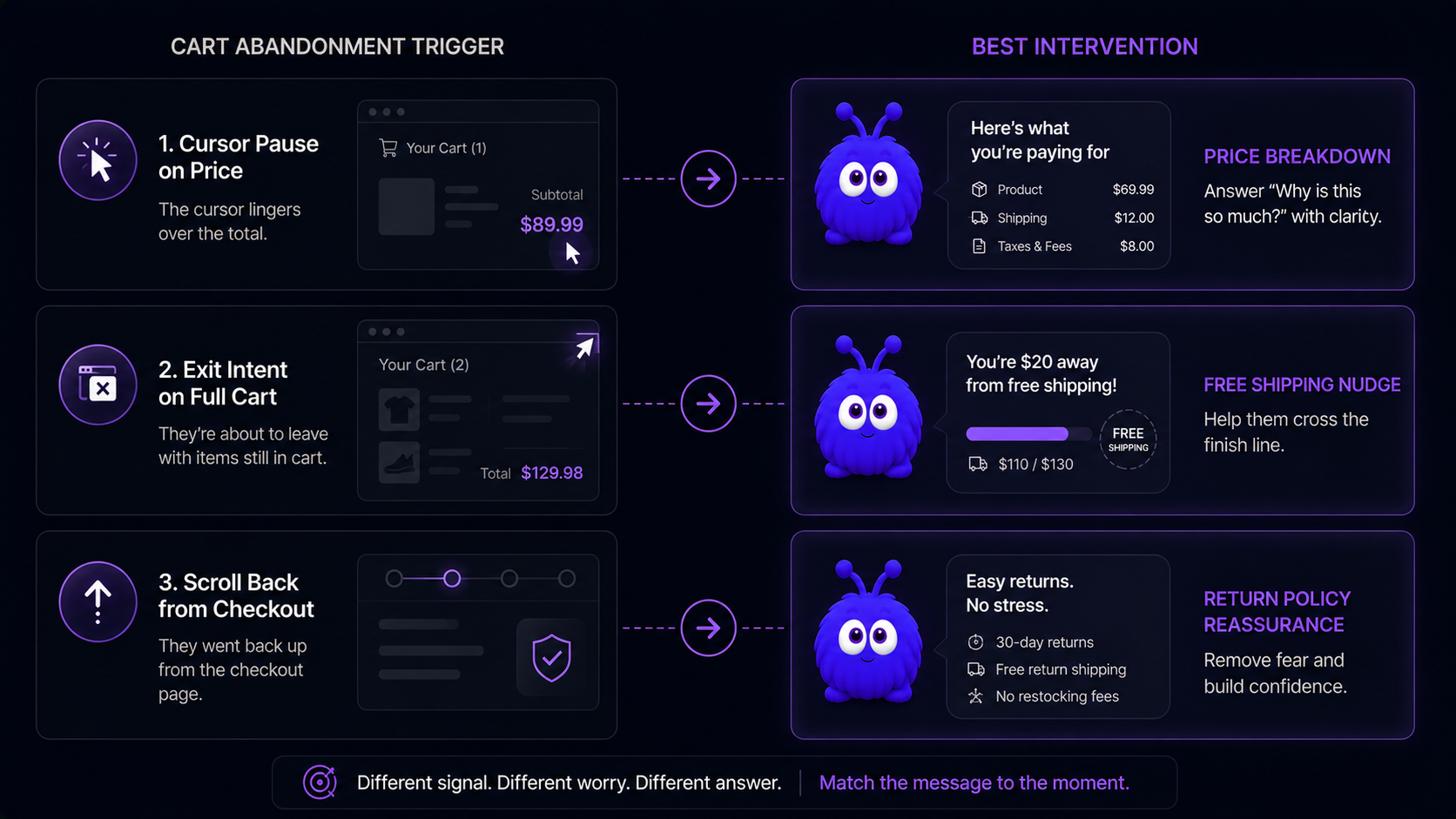
What does the intervention actually look like?
Detecting the moment is half the work; what you say is the other half. The trigger has to shape the response.
Friction-resolution. The cursor paused on the price, so the agent offers "Want me to walk through the price breakdown?" with a one-line summary of base price plus shipping plus tax.
Loss-aversion. The visitor is at exit-intent with a non-empty cart, so the agent surfaces the free-shipping threshold ("a little short of free shipping - want me to suggest something to round it out?"), framing the exit as an avoidable loss.
Reassurance. The visitor scrolled back from checkout to the cart, so the agent surfaces the return policy and shipping ETA, resolving the trust hesitation.
None of these work as a generic template. The trigger has to inform the response, or you are back to a popup wearing a nicer outfit.
Further reading
- GuideHow to recover abandoned cartsThe full recovery playbook this detection feeds.
- GuideThe proactive-engagement referenceHow the detected signals turn into interventions.
- ToolCart abandonment calculatorModel recovered revenue from real-time intervention.
- GlossaryIntent signalThe category each detection signal belongs to.
- GlossaryBehavioral interventionWhat you do once the signal fires.
- BlogBehavior-triggered chat vs time-on-page chatWhy timing alone fails as a trigger.
Frequently asked questions
Cursor-pause, dwell-with-no-activity, scroll-back, scroll depth, hover, tab-switching, and the exit-intent vector. Single-signal is noisy; two or three combined is what becomes worth acting on.
Last updated June 10, 2026.