If you run an accessibility audit on a typical store, the chat widget is usually the worst-scoring thing on the page. It is the part of the page most eager to help, and somehow the most likely to trip over its own shoelaces doing it. Most widgets get the easy parts right: color contrast passes, tap targets are big enough. Then they fall over on the parts that matter for someone using a keyboard or a screen reader: focus never moves into the chat, new messages arrive silently, and the mascot keeps cheerfully bouncing for a visitor who explicitly asked their browser to stop motion.
Audits got stricter through 2026, so newer widgets are in better shape. But the same handful of mistakes keeps showing up. This article walks through the 14 checkpoints, how to handle reduced motion, and what a screen-reader user actually experiences.
Why do AI chat widgets fail accessibility audits often?
Three things about chat surfaces make them harder than the rest of the page.
Animation. Mascots, message pop-ins, typing indicators, the occasional sound effect. Every one of those needs to back off when the visitor has set a motion preference, or it breaks WCAG 2.2 SC 2.3.3 (Animation from Interactions). Most widgets treat animation as pure decoration and never check the preference.
Modal patterns. The chat surface usually opens as an overlay on top of the page. Getting overlays right means trapping focus, handling the Escape key, returning focus to the trigger on close, and setting the dialog role and aria-modal attribute. There are a lot of small pieces, and they are rarely all correct the first time.
Dynamic content. Messages stream in over fetch or a websocket. Screen readers do not announce DOM changes on their own, so new content needs an explicit ARIA live region. Skip it, and a screen-reader user watches messages appear in total silence.
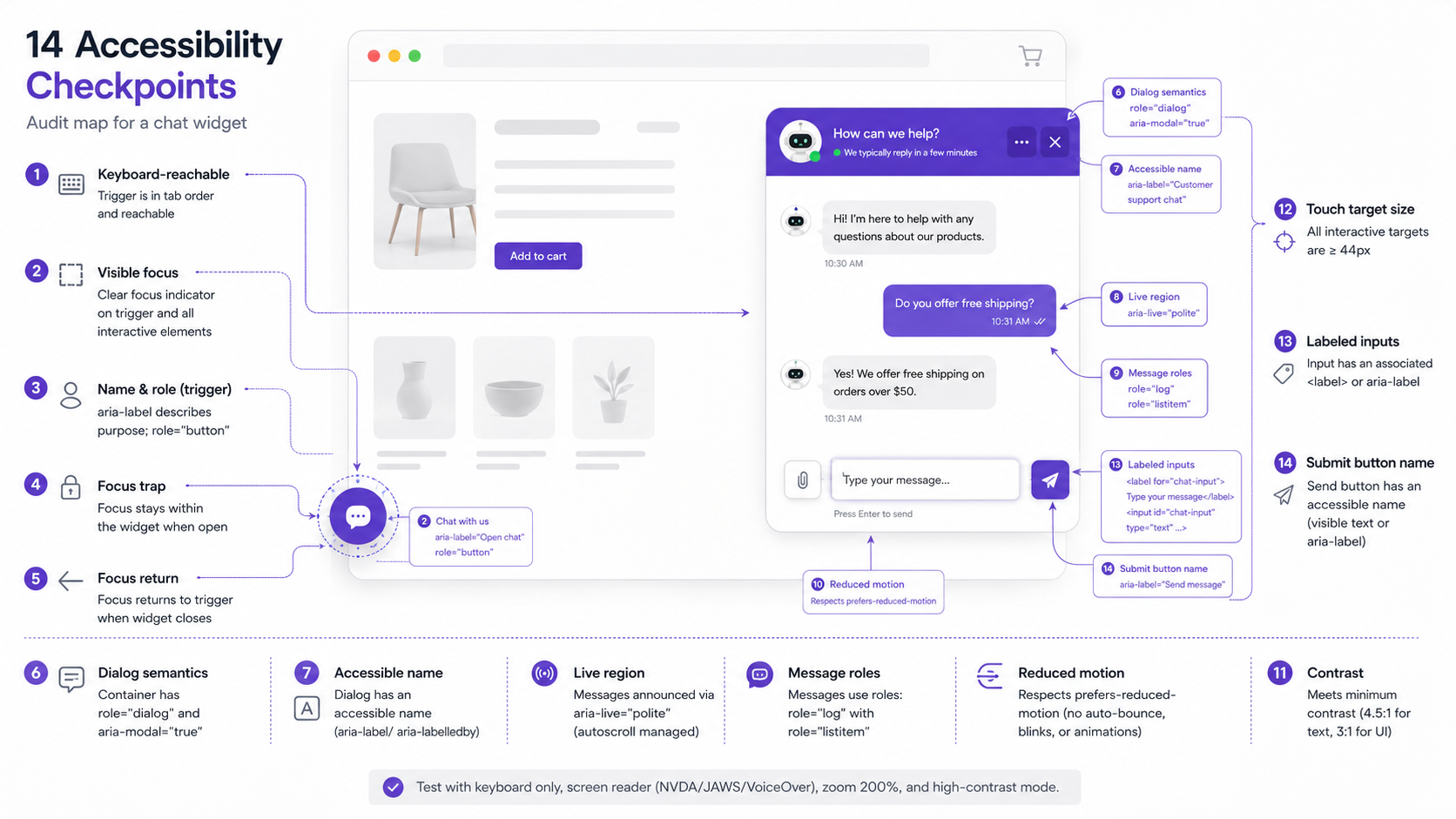
The 14 checkpoints below exist to catch each of these before they ship.
What are the 14 audit checkpoints?
| # | Checkpoint | WCAG 2.2 reference | Yokaify default |
|---|---|---|---|
| 1 | Keyboard-accessible chat icon (Tab + Enter) | SC 2.1.1 | Default on |
| 2 | Focus trap inside open chat surface | SC 2.4.3 | Default on |
| 3 | Focus return to trigger on close | SC 2.4.3 | Default on |
| 4 | ARIA roles (dialog, log, complementary) | SC 4.1.2 | Default on |
| 5 | ARIA live region for new messages | SC 4.1.3 | Default on |
| 6 | prefers-reduced-motion honored | SC 2.3.3 | Default on |
| 8 | Touch targets >= 44x44 px | SC 2.5.8 (WCAG 2.2 new) | Default on |
| 9 | Alt text for mascot and chat images | SC 1.1.1 | Operator-configured |
| 10 | Chat input labeled correctly | SC 3.3.2 / 4.1.2 | Default on |
| 11 | Send button labeled correctly | SC 3.3.2 / 4.1.2 | Default on |
| 12 | Error states announced via ARIA live | SC 3.3.1 / 4.1.3 | Default on |
| 13 | No auto-play / auto-advance | SC 1.4.2 / 2.2.2 | Default on |
| 14 | Visible focus indicator everywhere | SC 2.4.7 | Default on |
These cover WCAG 2.2 AA conformance for a chat widget. AAA is harder (the 7:1 contrast requirement is the usual sticking point) and rare in production, so AA is the practical target to hold a vendor to.
How do I handle prefers-reduced-motion?
Handle it in three layers.
Layer 1: the CSS media query. Turn off the decorative animations:
@media (prefers-reduced-motion: reduce) {
  .yokaify-bubble.yokaify-message.yokaify-mascot {
    animation: none !important;
    transition: none !important;
  }
}
Layer 2: JavaScript detection. CSS does not reach motion driven by a Rive state machine or other JS, so check the preference there too:
const reduceMotion = window.matchMedia('(prefers-reduced-motion: reduce)').matches;
if (reduceMotion) {
  riveInstance.pause;
  riveInstance.setStateAt(IDLE_STATE, 0);
}
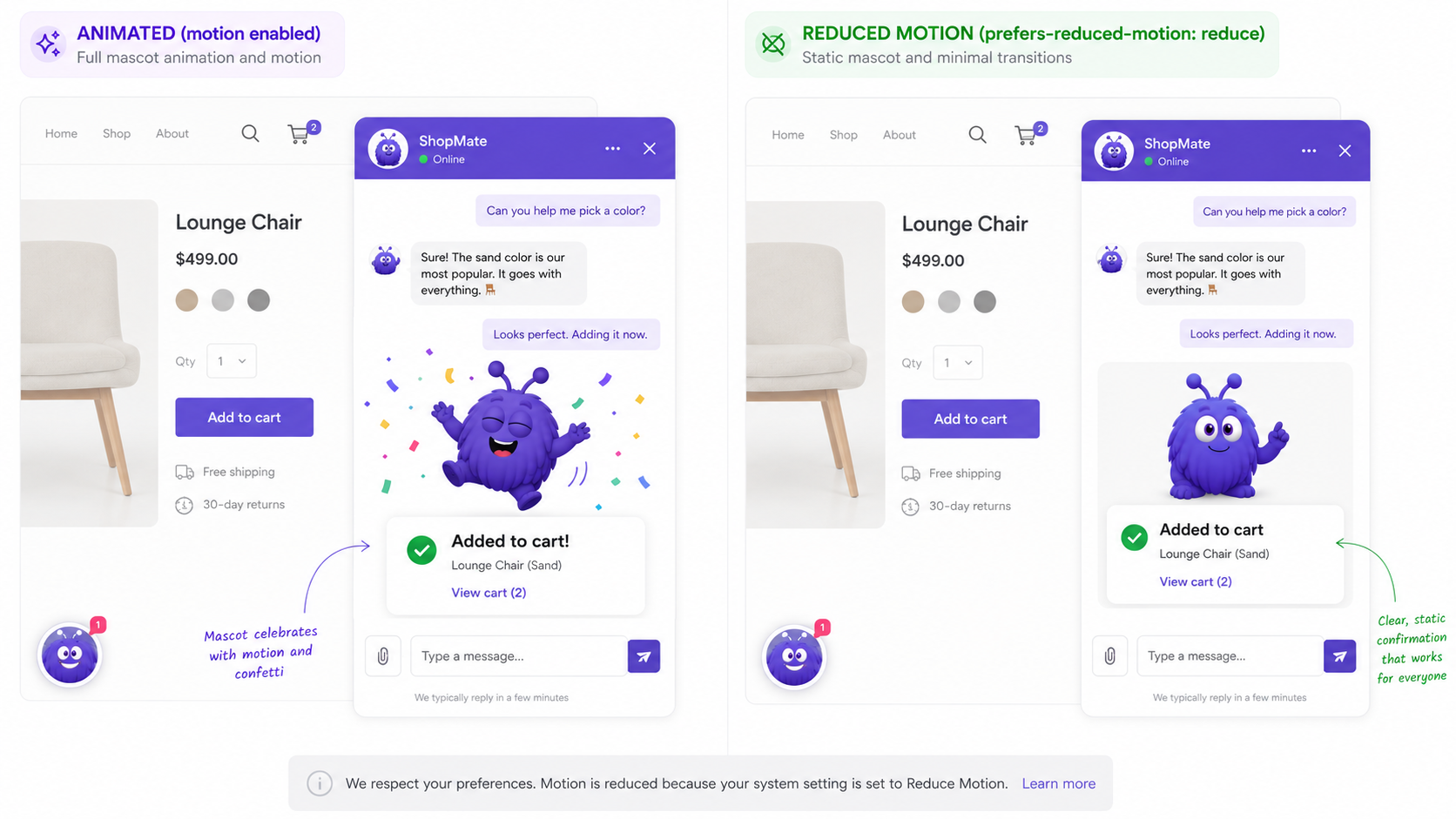
Layer 3: a real alternative, not just absence. When motion is off, swap the celebratory moments for static equivalents so the meaning still lands:
- Cart-add celebration: a bouncing mascot becomes a static checkmark with "Added to cart" text.
- Message send: a float-in becomes a plain appearance.
- Typing indicator: pulsing dots become static "Yokaify is typing..." text.
The Rive animation guide covers the runtime side, including how the state machine pauses for reduced motion.
What's the screen-reader experience?
Three patterns carry most of the weight.
Finding the chat icon. The icon is a real <button>, not a <div> with an onClick, and it carries a descriptive label:
<button aria-label="Chat with our AI agent" class="yokaify-trigger">
  <svg ...>...</svg>
</button>
Screen readers reach it by Tab and open it with Enter or Space.
Opening the surface. When the chat opens, it announces itself and moves focus inside:
<div
  role="dialog"
  aria-modal="true"
  aria-labelledby="yokaify-title"
  class="yokaify-surface"
>
  <h2 id="yokaify-title">Chat with us</h2>
  ... </div>
Focus shifts to the input or the latest message. Escape closes the surface and sends focus back to the icon.
Streaming messages. The message list lives inside a live region:
<div role="log" aria-live="polite" aria-relevant="additions" class="yokaify-messages">
  <!-- messages append here -->
</div>
aria-live="polite" (rather than assertive) means a new message waits for the current screen-reader speech to finish before it announces, so it does not talk over anything. The companion reference on pacing for returning visitors covers how often the agent should speak up in the first place.
What about animated mascots specifically?
A mascot adds a few wrinkles on top of the general patterns.
The canvas is invisible to screen readers. A Rive <canvas> reads as nothing, so wrap it and give it a name:
<div role="img" aria-label="Yokaify mascot, friendly chat assistant">
  <canvas id="mascot-canvas" width="240" height="240"></canvas>
</div>
Idle motion is decoration. The gentle bob or breathing loop should respect the motion preference and fall back to a still pose.
Reaction animations ride alongside text. A cart-add celebration plays at the same time as the message. The text is the real signal and reaches screen-reader users through the live region; the animation is flair for everyone else.
Faces read as social cues. Some people read a wink or a smile as a genuine social signal, and trust drops fast if the motion feels like it is being used to push them. The honest rule: never use mascot motion to manufacture an emotion in service of a sale that would not have happened anyway. We argue this one out in full in when an AI mascot becomes manipulative.
What WCAG 3.0 considerations are emerging in 2026?
WCAG 3.0 is still a working draft as of May 2026, with a stable release expected around mid-2027. A few shifts are worth tracking now because they change what "compliant" means:
- A score instead of a pass/fail. WCAG 2.x is binary; 3.0 introduces a 0-100 score across several dimensions.
- Cognitive accessibility. Plain language, predictable behavior, more generous time-outs, and explicit accommodation for neurodivergent processing.
- Reading level. Roughly grade 8-9 for general-audience content; specialized content can go higher with a warning.
- Layered conformance. Basic / Improved / Enhanced in place of AA / AAA.
A widget built today can already lean toward these by keeping its language plain, its behavior predictable, and its motion optional. The draft will keep moving, so treat anything you implement against it as provisional.
What should I expect from a chat-widget vendor?
Two things make the difference in practice.
The first is sensible defaults. Accessibility should be on out of the box, with the 14 WCAG 2.2 AA checkpoints satisfied without you flipping a single switch. Turning compliance off should be the deliberate, discouraged action, not turning it on.
The second is that it stays fixed. Accessibility regresses quietly; a refactor moves focus, a redesign drops a label. A vendor that tests every release with tools like axe-core and Lighthouse, and treats a regression as something to block rather than ship, is the one whose audit results hold up over time. The remaining gap is usually the surface you control yourself, such as mascot alt text and any custom theme colors, where the defaults are fine but your overrides can break things.
What this means for buyers
A short checklist when you are comparing widgets:
- Ask for WCAG 2.2 AA conformance, with the audit report. Not just a claim on a marketing page. A vendor that ships the 14 checkpoints by default saves you the regression risk.
- Test with real assistive technology. Automated tools like axe-core and Lighthouse catch most violations, but not all. Spend an hour with VoiceOver, JAWS, or NVDA and you will find the rest.
- Assume WCAG 3.0 is coming. A vendor already leaning toward the draft is set up for the 2027 release; one ignoring it is setting up migration work later.
The short version: chat widgets fail accessibility more than other surfaces because they are more complex, not because the fixes are mysterious. The 14 checkpoints are the fixes, and on-by-default plus tested-every-release is what keeps them in place.
Further reading
- GuideFrontend performance for ecommercePerformance and accessibility share many constraints.
- BlogRive animation tutorial (2026)Mascot animation patterns, including reduced-motion handling.
- BlogWhen an AI mascot becomes manipulativeThe ethics behind the no-pressure motion rule.
- BlogProactive chat complianceAccessibility is part of the broader compliance posture.
- BlogAnimated character vs static avatarThe conversion case for an animated, accessible character.
- ToolPage speed analyzerThe CWV side of the same quality discipline.
Frequently asked questions
Animation-heavy surfaces, modal patterns, and dynamic message updates each have specific WCAG 2.2 requirements that are rarely all correct on first ship.
Last updated June 10, 2026.